

Updated October 9, 2026. Developing an agentic AI system starts with one bounded task, clear success criteria, reliable tools, and human approval for consequential actions. Begin with a fixed workflow when the steps are predictable; give a model control over the next step only where that flexibility helps. Evaluate the whole process, including failures, cost, permissions, and recovery, before increasing autonomy.
A chatbot replies to messages; a workflow follows a defined path; an agent can choose its next actions within the limits you set. These patterns can be combined.
A lot of teams jump into developing an agentic AI system because the space is hot. The better way is to start with the problem, map the workflow, decide where autonomy is actually useful, and then build the smallest system that can do the job reliably.
This guide follows a problem-first design approach. It explains architecture choices, state, tools, evaluation, and safeguards through a support-ticket example. The example is illustrative, not a claim that the workflow has been deployed or benchmarked.
What Is an Agentic AI System?
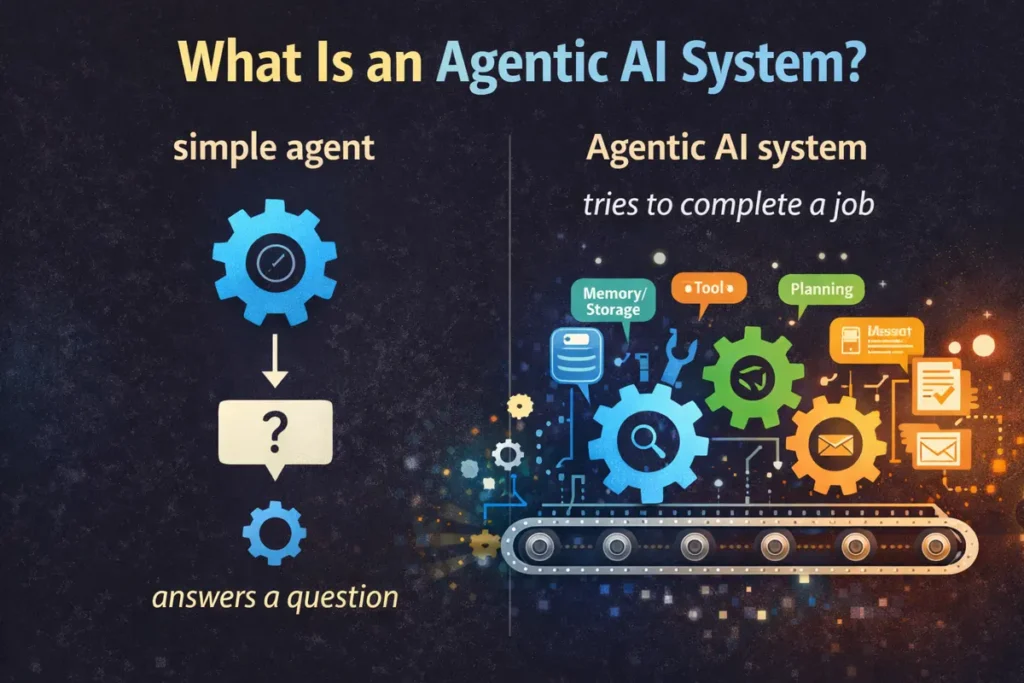
An agentic system may use a model to select actions and tools inside a software-controlled loop. Memory, planning, retrieval, and orchestration are design choices, not mandatory ingredients in every agent. Distinguish a fixed workflow from an agent whose next step is selected dynamically.
Think of it like this.
A simple agent answers a question.
An agentic system tries to complete a job.
That job might be things like reading a support ticket, checking account history, searching internal docs, drafting a response, asking for approval, and logging the result. That is not one prompt. That is a controlled chain of decisions, actions, and checks.
So when people talk about developing an agentic AI system, they are really talking about designing a working loop around the model. The model is important, yes. But the system design is what turns raw intelligence into useful behaviour.
Why a Problem-First Approach Matters
This is where many projects either become useful or become expensive demos.
A problem-first approach means you do not start with “we need an AI agent.” You start with “what task is slow, repetitive, messy, expensive, or hard to scale?” Then you look at the steps inside that task and ask where reasoning, retrieval, tool use, memory, or automation can actually help.
That sounds obvious. But teams still skip it.
They build for autonomy first. Then later they try to find a business reason for the thing they built. Bad order. A smarter path is to define the workflow, failure points, inputs, outputs, human checkpoints, and success metric before deciding whether the solution should be a single agent, a multi-step workflow, or something even simpler. OpenAI’s practical guidance on agents also pushes teams to begin with clear use cases, accuracy targets, and orchestration choices instead of throwing complexity at the problem.
Start by documenting the current process, failure costs, permitted inputs, required output, and approval boundaries. Compare a rules-based automation or fixed model workflow with an agent before adding autonomy. Choose the simplest option that meets the measured requirements.
- First, identify a real workflow.
- Next, break it into steps.
Then decide which steps need judgment, which need retrieval, which need action, and which need approval.
Separate retrieval, judgment, and actions. Reading a document, drafting a reply, issuing a refund, and deleting a record require different permissions and review rules.
Add autonomy incrementally. A structured workflow can be preferable when the sequence is known; a bounded agent may help when the next useful step depends on fresh information. Use stop conditions and recovery paths in either design.
Core Components of an Agentic AI System
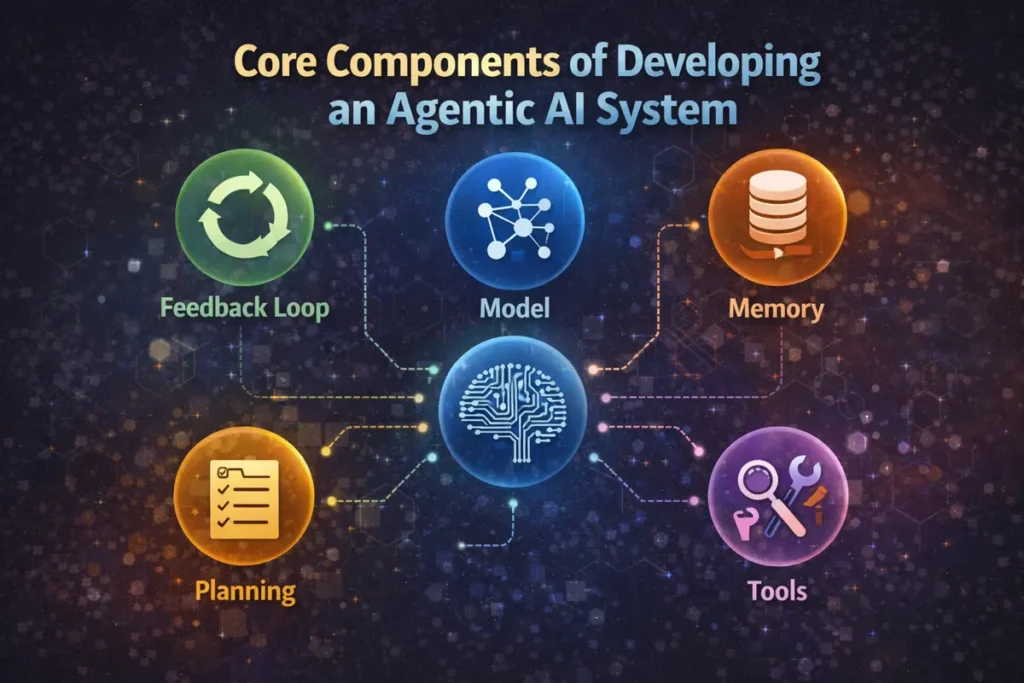
If you strip away the marketing language, most agentic systems come down to a few core parts.
State and Recovery
This is what keeps the system from becoming sloppy. The agent checks tool results, revises steps, asks for missing info, retries when something fails, and routes high-risk actions to human review. That loop is what turns one-shot output into a more reliable process.
These components matter because agentic behavior does not come from one magic prompt. It comes from how these parts work together.
Model
Keep state explicit: store the current task, completed steps, tool outputs, and any approval decision. A restarted worker should resume safely without repeating a completed write. Durable state is different from model conversation memory.
Memory
Memory helps the system stay grounded over time. That can mean short-term working memory for the current task, conversation memory for recent context, or longer-term stored facts, preferences, and past outcomes. Good memory is not “save everything forever.” It is selective context management.
Tools
Tools are how the system acts on the world. Search, calculators, APIs, databases, code execution, internal document lookup, ticket systems, CRMs, browsers, file readers.
Planning
Planning is the logic that breaks a goal into steps. That can be explicit or lightweight. Some systems create a plan first. Others plan step by step while executing. The right choice depends on the task, not on what sounds impressive.
Feedback Loop
This is what keeps the system from becoming sloppy. The agent checks tool results, revises steps, asks for missing info, retries when something fails, and routes high-risk actions to human review. That loop is what turns one-shot output into a more reliable process.
These components matter because agentic behavior does not come from one magic prompt. It comes from how these parts work together.
Single-Agent vs Multi-Agent Architecture
This is one of the most overcomplicated parts of the conversation.
A single-agent architecture means one main agent handles the job. It may use tools, keep state, and call different functions, but the orchestration stays centralized. This is easier to debug, easier to monitor, and usually the right starting point for most teams.
One agent may retrieve information. Another may plan. Another may review outputs. Another may interact with a user or external system. This can help when tasks naturally separate into clear roles, but it also adds coordination overhead, context passing issues, higher latency, and more places to fail. Anthropic’s guidance explicitly warns that the best systems are often built from simple patterns rather than unnecessary complexity, and OpenAI’s agent resources also present orchestration as a design choice that should follow the use case.
So when should you use each one?
Use a single agent when:
- the workflow is mostly linear
- the task scope is narrow
- tool use is straightforward
- you need easier testing and debugging
Use multiple agents when:
- roles are clearly different
- tasks branch in meaningful ways
- one agent would become overloaded
review or verification needs to be isolated from execution
But here is the honest builder advice: start with one. Prove the workflow. Measure performance. Then split into multiple agents only when the system has earned that complexity.
Tools, Memory, and Planning Layers Explained
These three layers are where most of the real system design work happens.
Tools layer
The tools layer is the bridge between reasoning and action. A useful agent can search a document store, call an API, check inventory, run a calculation, or update a record. But tool design matters more than people think. Poorly defined tools create bad outputs, fragile chains, and weird failure cases. Strong tools are narrow, well-described, predictable, and easy to test. Anthropic’s engineering guidance on tool writing makes the same point: better tools improve agent performance in a very direct way.
Memory layer
The memory layer controls what the system knows at each step. Either the system remembers too little and becomes forgetful, or it remembers too much and gets distracted by irrelevant context.
A practical memory design often includes:
- session memory for the current task
- retrieved context for relevant documents or knowledge
- optional long-term memory for user preferences or repeated patterns
That is enough for many real systems. Anthropic’s work on context engineering also shows that effective agents depend heavily on the quality and structure of the context they receive, not just on raw model capability.
Planning layer
Sometimes you want the system to make a short plan up front. That helps with long workflows. Other times you want simple stepwise execution where the agent decides one move at a time based on fresh tool output. Neither is automatically better.
What matters is control.
If the task is high-risk, planning should be explicit and inspectable. If the task is lightweight, over-planning just adds delay.
Starter workflow example
Here is a clean starter workflow for developing an agentic AI system without making it too complex:
A user submits a support issue.
The system classifies the request.
It retrieves account context and relevant internal docs.
The agent drafts an answer or next action.
A rules layer checks for policy, confidence, and risk.
A reply about approved, nonsensitive troubleshooting may be sent automatically only under an explicitly authorized policy and after required checks pass. Never use the model’s confidence statement as the sole authorization check.
Account changes, refunds, sensitive disclosures, and uncertain cases go to a human reviewer. Require approval immediately before the specific write and bind it to the action and current data.
The final outcome gets logged for future evaluation.
That is already an agentic workflow. Not because it sounds futuristic. Because it has reasoning, tools, memory, orchestration, and a feedback path.
Safety, Guardrails, and Human Oversight
NIST’s AI Risk Management Framework and its Generative Artificial Intelligence Profile provide guidance for managing AI risks. Use them alongside concrete controls such as scoped permissions, review gates, monitoring, and incident recovery. A framework reference is not a certification that a system is safe.
NIST Generative Artificial Intelligence Profile
NIST’s AI Risk Management Framework and its Generative Artificial Intelligence Profile provide guidance for managing AI risks. Use them alongside concrete controls such as scoped permissions, review gates, monitoring, and incident recovery. A framework reference is not a certification that a system is safe.
In practical terms, guardrails usually mean a few things:
- limiting what tools the agent can use
- validating inputs and outputs
- setting rules for what actions require approval
- adding fallback behavior when confidence is low
- logging traces so failures can be reviewed
- separating harmless drafting from high-impact execution
Human oversight matters most when the agent can make decisions that affect customers, money, compliance, legal exposure, or production systems. In those cases, “human in the loop” is not a buzz phrase. It is a control point.
Evaluation and testing
Evaluate the complete workflow: retrieval quality, correct tool use, task completion, unauthorized actions, recovery, latency, and total cost. A passing prompt example is not enough to establish production reliability.
That includes:
- task success rate
- tool-call accuracy
- step quality
- latency
- failure recovery
- hallucination rate
- escalation quality
- consistency across repeated runs
Build a test set from representative, permitted examples and keep a separate regression set. Include missing records, contradictory sources, tool timeouts, duplicate requests, hostile document instructions, and denied approvals. Improve one layer at a time so you can identify the reason for each change.
Pilot acceptance checklist: define these checks before allowing the system to act on live records.
| Check | Failure case | Expected behavior |
|---|---|---|
| Retrieval | No matching account or conflicting documents | Ask for context or escalate; do not invent a record |
| Authorization | Refund or disclosure not approved | Block the write and request a specific approval |
| Tool reliability | Timeout or uncertain write result | Check durable state before retrying; prevent duplicate writes |
| Prompt injection | Document instructs the agent to ignore rules | Treat retrieved instructions as untrusted content |
| Recovery | Worker restarts partway through a task | Resume from logged state without repeating completed actions |
| Quality and cost | Correct answer needs many retries | Measure accepted-task rate, review time, latency and full cost |
A simple way to test is to create a task set from real examples, define what success looks like, run the system on those cases, and inspect where it breaks. Then improve one layer at a time. Maybe the model is fine, but retrieval is weak. Maybe the tools are vague. Maybe the planning loop over-thinks simple tasks. Good evaluation helps you see the real problem instead of guessing.
Common Mistakes When Developing an Agentic AI System
The first big mistake is building the architecture before defining the job. That is how teams end up with a clever system that solves nothing important.
The second mistake is adding too much autonomy too early. Full autonomy sounds powerful. But if the workflow is not stable, more autonomy usually means more random behavior.
Another common mistake is weak tool design. People blame the model when the real issue is that the system is calling the wrong tool, getting poor responses, or working with unclear function descriptions.
Memory is another trap. Some teams dump huge amounts of context into every turn and hope the model sorts it out. That rarely ends well. Context needs structure.
And then there is testing. Many builders test with handpicked happy-path examples. Of course the demo works. Real users do not behave like demos.
One more thing. Multi-agent systems often get introduced too soon. It feels advanced. It looks good in a diagram. But if you cannot explain why each extra agent exists, you probably do not need it.
Best Practices for Building Agentic AI Applications
Start narrow. Choose one workflow with clear value.
Keep the first version understandable and observable. Use a defined scope, limited tools, durable state, clear stop conditions, and rollback where possible. Expand only after the pilot meets its acceptance criteria.
Use one agent before many. Add specialized agents only when role separation gives a real benefit.
Design good tools. Keep them clear, bounded, and easy to verify.
Treat memory as a product decision, not just a storage feature. Decide what should be remembered, for how long, and why.
Make planning visible where possible. Hidden complexity is hard to improve.
Build safety into execution paths. Especially if the system can send, update, approve, purchase, delete, or trigger downstream actions.
Evaluate with real tasks, not only synthetic examples. That is where real quality shows up.
And keep the workflow tied to a business outcome. Time saved. Error rate reduced. Faster resolution. Better consistency. Lower manual load. Something measurable.
That is the real mindset behind building agentic AI applications with a problem-first approach. You are not trying to make the most autonomous system on the internet. You are trying to build a system that handles useful work with enough reliability that people can trust it.
FAQs
What is the difference between an AI agent and an agentic AI system?
An agent uses a model to choose actions within limits; an agentic system includes the software, tools, state and controls around that behavior. A fixed workflow follows predefined steps. Memory, planning and multiple agents are optional design choices, not mandatory features.
Is developing an agentic AI system only for big companies?
No. Smaller teams can build agentic systems too. The key is to start with one focused workflow instead of trying to automate everything at once.
Do I need a multi-agent setup from day one?
Usually no. A single-agent workflow is easier to build, test, and improve. Multi-agent architecture makes more sense when the work clearly splits into specialized roles.
What is the best way to start building agentic AI applications with a problem-first approach?
Start by picking one real workflow. Break it into steps. Mark where reasoning, retrieval, action, and human approval are needed. Then build the smallest working version that solves that workflow reliably.
Why do so many agentic AI projects fail?
Common problems include unclear success criteria, unnecessary autonomy, weak tools, poor retrieval, missing recovery paths and insufficient evaluation. Measure the actual failure points instead of assuming the model alone is responsible.
How do I know if my agentic system is good enough for production?
You need more than a nice demo. Look at task success rate, tool reliability, consistency, risk handling, fallback behavior, and how well the system performs on real-world cases over time.
